Dragging the Microsoft Surface table from 2008 to 2026 with Claude
I brought the 18-year-old Microsoft Surface / PixelSense table into the modern age over the course of four weeknights, using Claude to reverse engineer the original 32-bit drivers and reimplement them in Rust for modern 64-bit Windows. While this is just about making my coffee table work better, I think there’s something interesting here about how LLMs enable interoperability where it wasn’t worth the effort before.
Background
The Microsoft Surface (or PixelSense) is a multitouch tabletop computer released in 2008, intended for multi-user interaction with up to 52 touch points and equipped with the ability to detect objects placed on it. For a little while, it was the showpiece for any venue that wanted to flaunt that it was part of the future - my university library had a couple, for example. They didn’t actually solve a problem that most people had and were quite expensive, so the product line died and the name was recycled for a line of Windows tablets and laptops.
The technology behind its display was wild then, and honestly still is: rather than a capacitive touchscreen like we see on devices today, the screen was just a piece of coated acrylic with a rear projection from below. To register touches, an infrared illuminant below the surface floods the screen with IR light from underneath. When a finger or object touches the screen, it reflects IR back downward, where it is picked up by five IR-sensitive cameras positioned in an array below the table - a technique known as rear diffused illumination. This is what allowed the Surface to not only detect finger touches but also recognize tagged objects placed on the display. The camera output is fed into a PCI card on an integrated host computer, where it is processed by a TI DSP and passed to userspace for computer vision processing to turn frames into “touches” and “objects”.
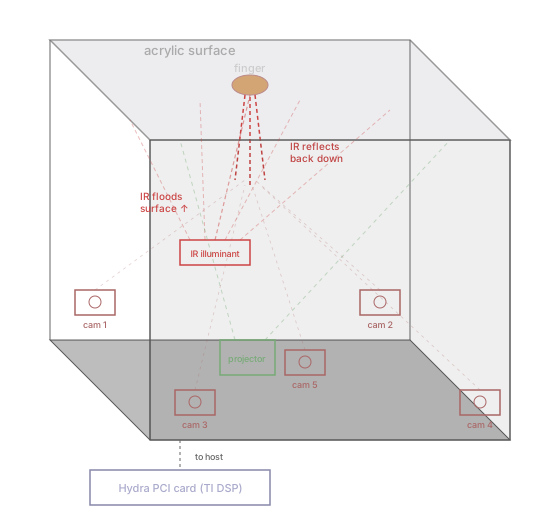
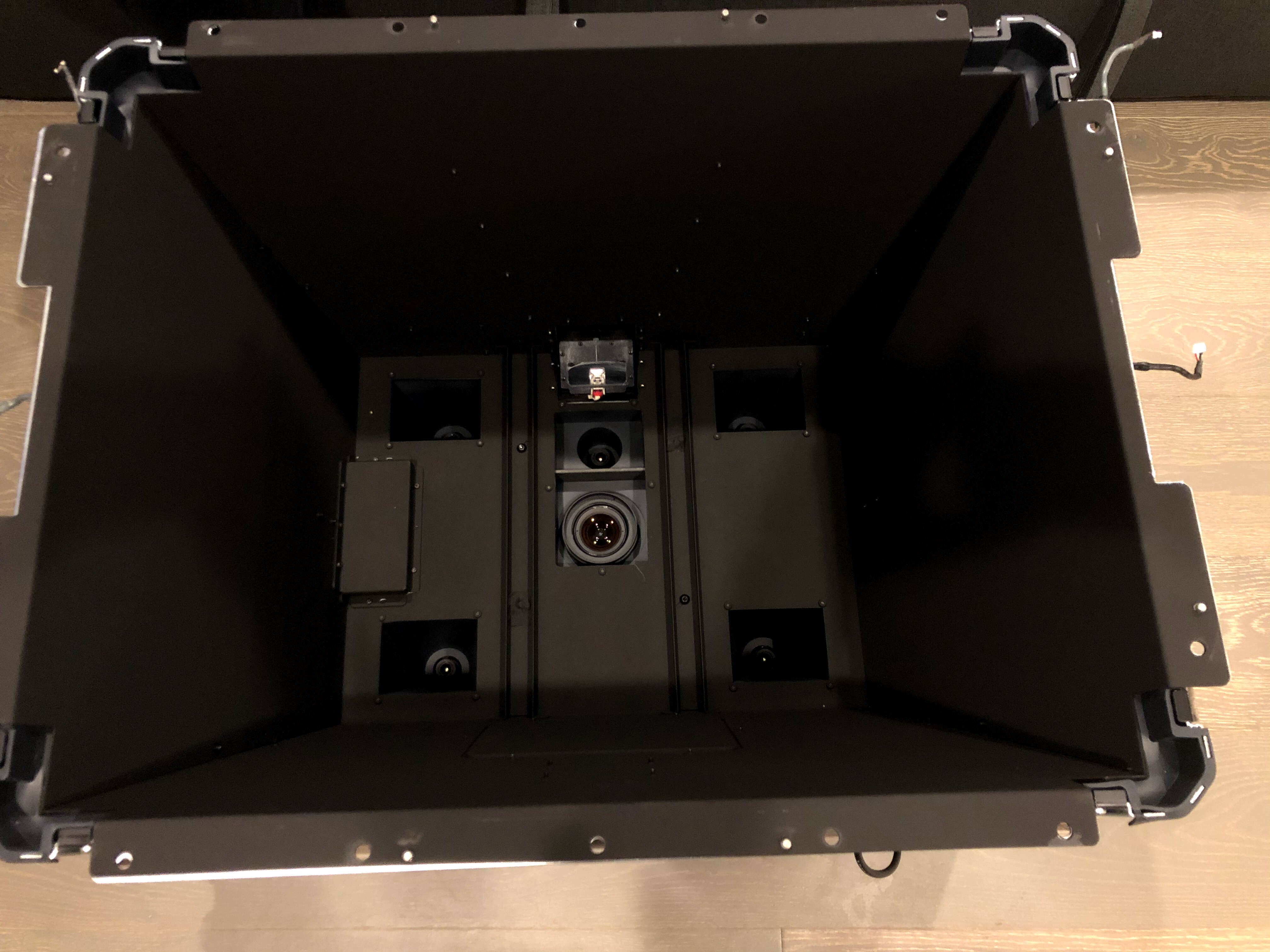 Inside the projection chamber with the screen removed. The projector lens is in the center, flanked by the five IR cameras that capture touch and object data.
My partner found several for sale at an e-cycler on Craigslist in 2019. It’s been our coffee table ever since. Unfortunately, while it’s good at being a table and is an interesting conversation piece, it hasn’t been particularly useful for computing due to the age of the computer inside. Ideally, I’d like to have it integrate with my media center and home automation with a custom interface.
The PCI card, codenamed “Hydra”, is the focus of this project. Given the era this product was released in, it only ever shipped with 32-bit drivers targeting Windows Vista, and no source code was ever publicly made available. This means that we can’t ever run a 64-bit version of Windows, effectively limiting us to 4GB of RAM. Additionally, Windows itself is EOL on 32-bit processors - there is no Windows 11, and Windows 10 is rough on 32-bit. So while we could keep it on Vista 32-bit for preservation’s sake, we basically need to port the driver to 64-bit to have a usable experience in 2026.
Everything else should continue to work on modern Windows - the userspace .NET libraries and software
continue to work under WoW64, the DSP firmware is just an opaque blob that gets loaded by the driver,
and there already exists software to bridge the .NET API into Windows-native multitouch input. We just need
to make the driver work. I’m a security engineer with software development, systems, and reverse engineering experience, but
I had no prior experience with Windows kernel development, PCI internals, or Rust, and have only a loose grasp on
x86 binary reverse engineering.
How to build a modern driver without a clue
Static analysis and spec generation
As an approximation of clean room design methodology, I had Claude separate the development into a “discovery” phase based on the original driver, followed by an “implementation” phase based solely on the knowledge gained. This avoids verbatim copying of the original implementation, and as a side effect produces a high quality specification that lives independently from the code. Such a specification might be useful in the future - say, for implementing a Linux driver.
Here’s an excerpt from the specification it produced, describing the shared memory mailbox used for host-to-DSP communication:
| Offset | Name | Description |
|---|---|---|
+0x08 | MSG_TYPE | Interrupt/message type ID (0-3) |
+0x0C | HEARTBEAT | DSP heartbeat counter |
+0x10 | READY_FLAG / FRAME_COUNT | During boot: non-zero once DSP firmware is operational. After boot: repurposed as frame counter. |
+0x14 | STATUS_A | Mailbox status word (cleared to 0 by host after reading) |
+0x68 | COMMAND | Command type ID. Written last to trigger DSP processing. |
+0x6C | CMD_PARAM1 | Command parameter 1 |
+0x70 | CMD_PARAM2 | Command parameter 2 (typically payload DWORD count) |
+0x74.. | CMD_PAYLOAD | Command payload data (max 758 DWORDs = 3032 bytes) |
I’ve been experimenting with AI-driven reverse engineering for a little while now, so I have a standard environment that provides a bunch of useful tools for Claude Code to use. I spun it up in an unprivileged container with “bypass permissions” mode to allow tools to run without approval, getting myself out of Claude’s way, and asked it to start generating a specification sufficiently detailed to produce an independent implementation. When it finished, I wiped its context and asked it to critically analyze the specification, identify anything suspicious or ambiguous, and refine it with additional static analysis. This continued for several loops until the analysis bottomed out on trivia or nitpicks. Here are a couple of examples of issues discovered through that refinement:
- At one point, the spec labeled a struct field for
GET_CAMERA_FRAMEasline_count, but the actual meaning of the field wasbytes_per_line. If implemented, this would result in a client passing “640” in a situation where the driver is typically expecting “480”. - The spec originally described two fields in
GET_COMBINED_FRAMEas being PCI BAR addresses exposed to userspace. In reality, they’reVirtualAllocprovisioned user-mode addresses provided by the client.
Iterative development environment
Claude works most efficiently when it can iterate independently, so the dev environment needed to give it everything a human would have: hard power resets in response to BSODs, the ability to move hardware between OSes, and access to a kernel-level debugger. I came up with this:
- Ubuntu host with Hydra card attached, running Claude Code and 3 VMs with KVM / virt-manager
- Windows 7 32-bit with original driver installed (“reference”)
- Windows 11 64-bit for testing new driver (“target”)
- Windows 11 64-bit as kernel debug host connected to target over virtual serial (“debugger”)
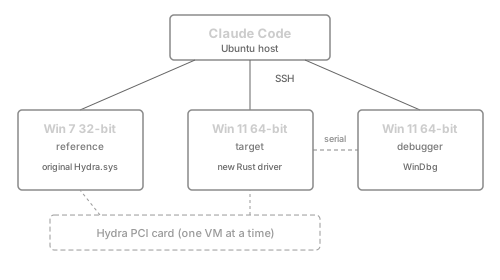
I collaborated with Claude on what the ideal setup would be to make this work ergonomically for an agent. We settled on SSH servers on each guest, and a Samba mount back to the host for sharing code and binaries. Claude would manage the libvirt configs, moving the Hydra card between VMs as needed. I also gave it instructions to build scripts for common tasks rather than trying to continually juggle copy, build, and init commands by itself, which definitely seemed to reduce time wasted on issues like shell escaping.
Creating a test suite
Once the environment was set up, I asked Claude to turn the specification into an exhaustive set of userspace tests. This would allow us to validate our static analysis and specification against the actual original driver, and kick any discrepancies back to the research phase for refinement. The tests define the exact byte-level contract between userspace and the driver:
#[repr(C)]
struct HydraCombinedFrame {
    metadata: [u8; 0x10],        // +0x000
    frame_data: [u8; 0x2F0],     // +0x010: change bitmap
    buf0_va: u32,                // +0x300: user VA (cameras 0-3)
    buf0_size: u32,              // +0x304: buffer size
    buf0_stride: u32,            // +0x308: output stride (bytes/row), min 0x510
    buf0_mdl: u32,               // +0x30C: (driver-internal) MDL pointer
    buf0_kernel_va: u32,         // +0x310: (driver-internal) kernel mapping VA
    buf1_va: u32,                // +0x314: user VA for camera 4
    buf1_size: u32,              // +0x318: buffer size
    buf1_stride: u32,            // +0x31C: output stride (bytes/row), min 0x280
}
The generated test suite passed 95% of its tests immediately against the original Hydra.sys on the
Windows 7 reference VM, indicating that the specification was mostly accurate. Once the remaining
issues were resolved and the specification updated, we ended up with 227 total tests,
and it was time to move on to implementing the driver.
Driver implementation
For the actual implementation, I asked Claude to determine its own plan of attack, reminding it that it had both the specification and the test suite to work from. Rust was a natural choice for the implementation: we get memory safety on a substantial portion of the driver code, and the compiler’s error messages give Claude something actionable to iterate on. The plan operates in layers, starting with a proof-of-concept driver, gradually introducing software-only features, then incrementally adding hardware integration. It came up with this approach, autonomously validating functionality at each checkpoint with the test suite:
- Start with a “hello world” to validate that we can build and run a Rust-based driver
- Implement the IOCTL dispatch with userspace validation but no hardware interaction as a root enumerated driver (one loaded without actual hardware present, for testing the software interface in isolation)
- Perform input validation on userspace IOCTL input and maintain required per-client state
- Switch to producing an actual PCI driver, map the BARs and load the DSP firmware
- Implement interrupts and shared-memory mailbox for DSP communication
- Set up DMA buffers and wire up the camera frame retrieval IOCTLs
- Handle edge cases, e.g. multi client state management
I let this run overnight, and within about 5 hours, the build had gone green with the entire test suite passing.
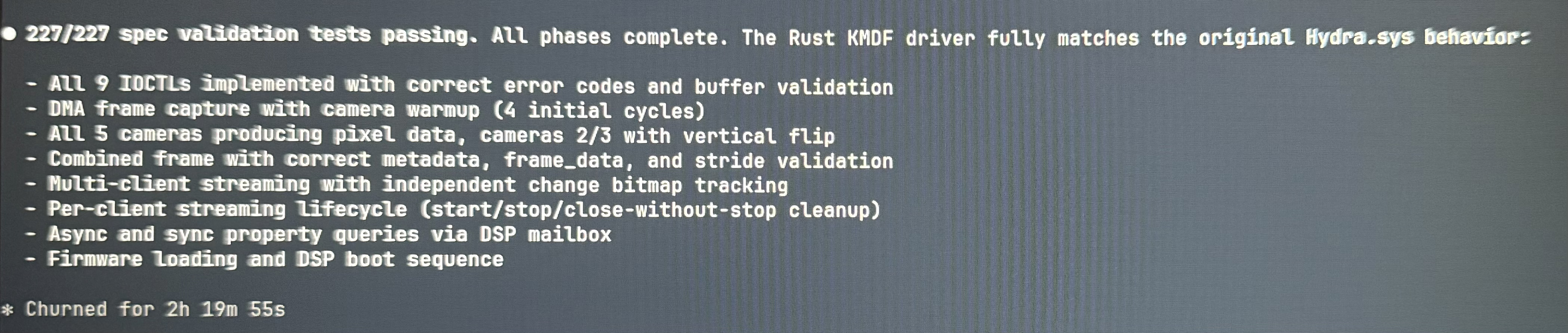 (Sorry for the phone photo - I stumbled downstairs at 5AM to check on it.)
Here’s the START_STREAMING IOCTL handler - when a client starts streaming, the driver
has to manage per-client state, clamp the frame interval, and if it’s the first client, warm up the
cameras with a few DMA cycles before real data starts flowing:
fn handle_start_streaming(request: WDFREQUEST, input_len: usize, file_object: WDFFILEOBJECT) {
    let Some(state) = FILE_STATES.get(file_object) else {
        complete_request(request, STATUS_INVALID_DEVICE_REQUEST, 0);
        return;
    };
    if state.streaming {
        complete_request(request, STATUS_INVALID_DEVICE_REQUEST, 0);
        return;
    }

    let mut frame_interval = unsafe { *(in_buf.add(START_INTERVAL_OFFSET) as *const u32) };
    if frame_interval == 0 { frame_interval = DEFAULT_FRAME_INTERVAL; }
    if frame_interval < MIN_FRAME_INTERVAL { frame_interval = MIN_FRAME_INTERVAL; }

    state.streaming = true;
    state.frame_interval = frame_interval;
    state.change_bitmap = [0; CHANGE_BITMAP_SIZE];
    let prev_clients = G_STREAMING_CLIENTS.fetch_add(1, Ordering::SeqCst);

    // Update minimum interval across all clients
    let _ = G_MIN_INTERVAL.fetch_update(Ordering::SeqCst, Ordering::SeqCst, |cur| {
        if frame_interval < cur { Some(frame_interval) } else { None }
    });

    // First streaming client: kick off DMA with warmup cycles
    if prev_clients == 0 && G_DSP_READY.load(Ordering::Acquire) != 0 {
        G_DMA_ACTIVE.store(1, Ordering::Release);
        for i in 0..4u32 {
            send_frame_request(true);
            poll_and_process_response();
            if i < 3 { sleep_ms(5); }
        }
    }
    complete_request(request, STATUS_SUCCESS, 0);
}
Of course, this didn’t mean that everything was necessarily working correctly - when I came back and reviewed its work, there were definitely still gaps in the implementation, and the returned frame data was present but was garbled with the incorrect stride (bytes per row of the image). Here are some of the ways it failed, a mix of things that it figured out on its own and things I found during my review:
- The very first driver load attempt BSODed with a
WDF_VIOLATION. It turns out that Windows comparesWDF_OBJECT_ATTRIBUTESContextTypeInfoby pointer identity, not value, which wasn’t what Claude expected. Throughout the rest of the implementation, the target host BSODed 31 times. - The first crack at pulling pixel data from the DSP had the comment “DSP writes pixel data at 640-byte stride directly.”, sourced from the specification. During debugging, Claude convinced itself this was wrong, performed some additional static analysis on
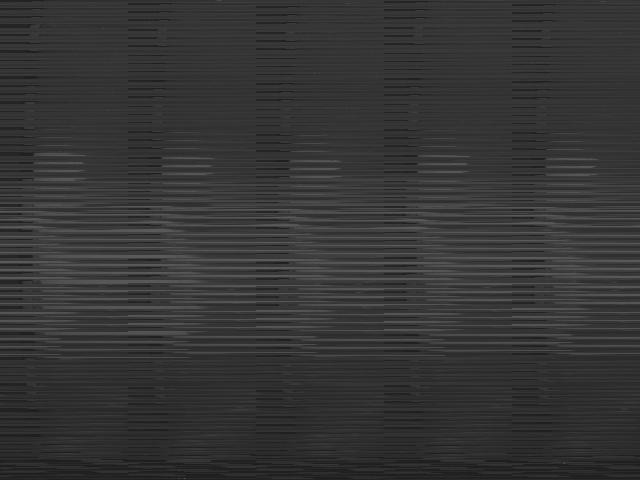
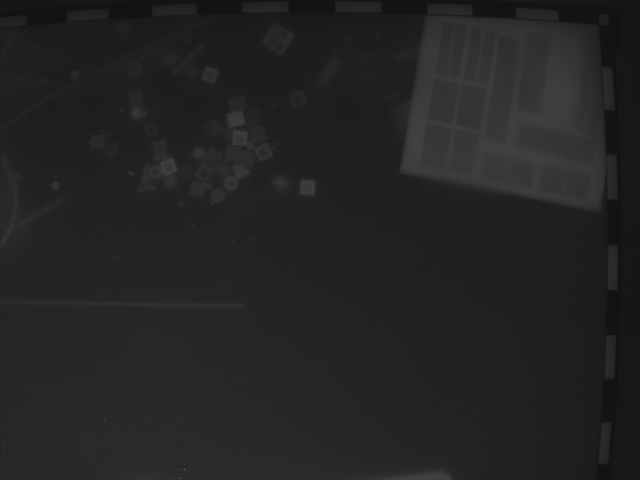
Hydra.sys, found a tile-based stride conversion algorithm, implemented it, and then spent hours debugging issues with it. A raw dump finally proved that the original strategy was correct, and that the fix was to delete everything and go back tomemcpy. - After all specification tests passed, I checked the captured frames and noticed that they were garbled with what appeared to be the wrong stride. After Claude fixed the issue, I noticed that the frames were flipped as compared to the reference driver. Claude wasn’t able to notice this because it hadn’t thought to look at the images using its own multimodal input, and it wasn’t aware of the fiducial checkerboard pattern around the edges of four of the five cameras that could be used to check orientation.
Refinement
When I knew we had something functional, it was time to refine the output. I used the same technique that worked well for the specification earlier - having several subagents review the code, raise issues, and iterate on them until we roughly converged. This found several issues and pretty clearly improved code quality. The test suite was, of course, instrumental in keeping everything working here.
- A cross-validation pass between the code and the test suite identified that 34 of the tests would effectively always pass; they were exercising IOCTLs and logging some data, but made no assertions about the data in the response from the driver.
- Multi-client tests were flaky because the original driver uses a background thread to continually process frames, while the reimplementation only processes deltas while servicing IOCTL requests.
- When comparing latencies between the two drivers, I noticed that Claude had put a “warmup” set of transfers in the
START_STREAMINGIOCTL, making it take significantly longer than the reference. Once I pointed this out and it was removed, we started getting torn data in the camera frames. It turns out that it had implemented the double buffering incorrectly, and the warmup time was hiding any visible symptom of it reading the wrong buffer.
Results
The working driver is available at https://github.com/schlarpc/surface-hydra-rs. As with all hobbyist drivers, you’ll need to be in test signing mode in order to load it, because I haven’t gone through the Microsoft driver signing process. From my testing, it interoperates completely with all existing Surface software, and my coffee table is now happily running an up-to-date copy of Windows 11 64-bit. All of the work was done using Claude Opus 4.6 via Claude Code, and fit comfortably within the $200/mo Claude Max plan without hitting limits. Running a modern version of Windows was the first goal since that keeps the original Surface software working, but I’d like to investigate building a Linux driver in the future as well.
I think this project illustrates an exciting possibility for the future of interoperability. You can write clients for services that don’t offer open APIs, write your own firmware for IoT devices, or fight planned obsolescence by forcing your way through driver compatibility. I’ve had success doing this with websites using HAR captures as input, BLE protocols based on a device’s associated Android APK, and now doing low-level kernel development against a PCI card. None of these were impossible before, but when it becomes easy, cheap, and obvious, what changes?